Case Study: Building Backbeat - Background Audio in Flutter
A personal Flutter project where every layer fought back: capped media URLs that fail like they succeeded, and a player that reported exactly twice the real duration.
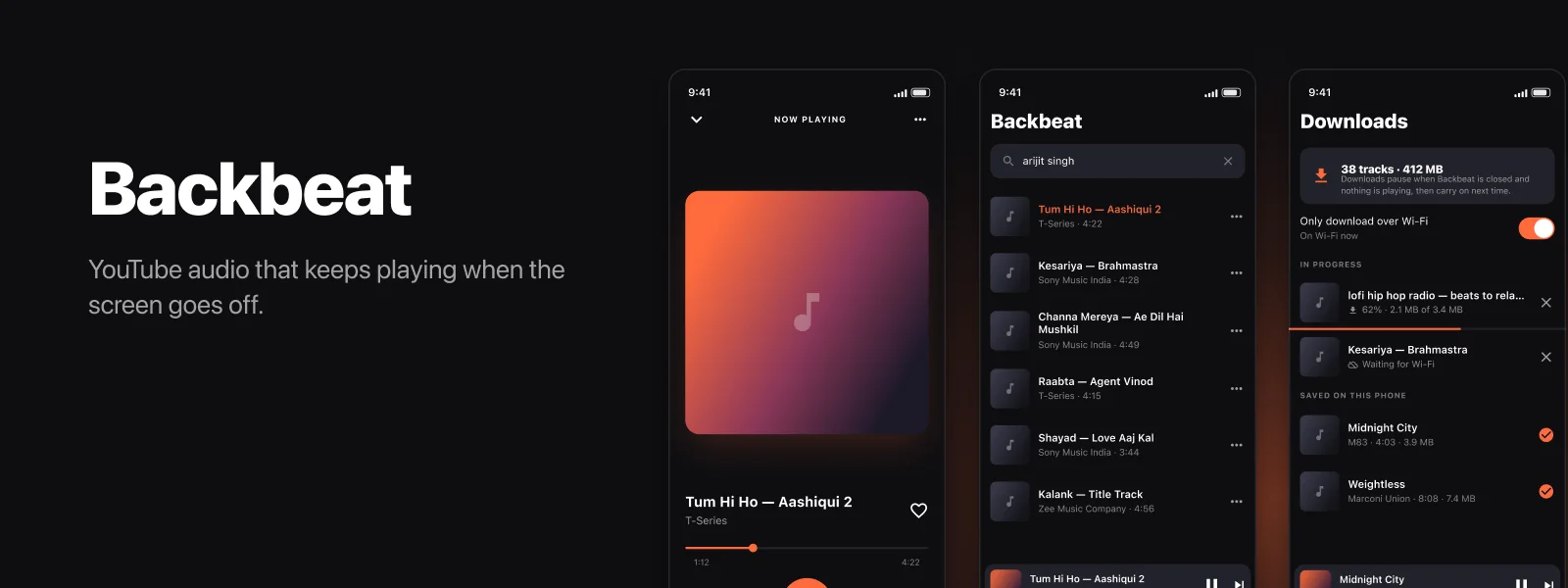
Backbeat is a Flutter audio player for iOS that keeps playing with the screen off. It is a personal project, sideloaded to my own phone, not distributed and not on the App Store. I am writing it up because of what went wrong rather than what it does: two of its bugs were the kind where every obvious explanation is wrong, and finding them needed purpose-built tools rather than more guessing.
| Platform | Screens | Tests | Worst bug |
|---|---|---|---|
| Flutter / iOS | 13 | 18 | 2x reported duration |
Project Overview
The brief was small and personal: play audio in the background, work on a plane, and survive the reinstalls that sideloading forces on you. What made it interesting is that almost every layer was adversarial. The media source actively resists being read by anything except its own client. Apple's player disagreed with the audio files about how long they were. And the platform deletes your data whenever you reinstall the app.
What it needed to do
- Background playback that survives lock, app switching and route changes
- Search, or resolve a pasted link, and start playing in one tap
- Offline playback with no network at all
- Playlists, a reorderable queue and a sleep timer
- Its own backup and restore, because sideloaded apps get wiped
Technology Stack
Flutter, Dart, just_audio, audio_service, audio_session, Hive, connectivity_plus. Diagnostics in Swift and Python against AVFoundation and ffprobe.
Technical Challenges
Challenge 1: The media URLs were capped, and the failure looked like success
Resolved URLs looked perfectly valid. Requests for the start of the file returned 200. But playback died seconds in, because the server served only the first megabyte and answered 403 for every byte after it.
This is a nasty failure mode. A media player does not fetch a file in pieces the way a download manager does; it opens one long request and streams. So the URL passes every casual check you throw at it and then fails the moment something real depends on it.
Solution: Verify before the player ever sees the URL
The cheapest possible proof that a URL is not capped is to read two bytes from beyond the cap. A capped URL rejects any range that does not begin at byte zero, so this separates good URLs from bad ones in a single round trip and no meaningful bandwidth.
/// Reads two bytes from well past the start of the file. A capped URL
/// answers 403 for any range that does not begin at byte zero, so this
/// catches the failure before the player ever sees the URL.
Future<int> _verify(Uri url, int sizeBytes) async {
  final client = HttpClient()..connectionTimeout = const Duration(seconds: 10);
  try {
    final offset = sizeBytes > 1200000 ? 1048576 : 0;
    final range = offset == 0 ? 'bytes=0-' : 'bytes=$offset-${offset + 1}';
    final request = await client.getUrl(url);
    request.headers.set('Range', range);
    final response = await request.close().timeout(const Duration(seconds: 12));
    await response.listen(null).cancel(); // abort without downloading the body
    return response.statusCode;
  } catch (e) {
    return -1;
  } finally {
    client.close(force: true);
  }
}
Around that sits an ordered list of client identities to try, with the one that worked most recently remembered and tried first, plus manifest reuse and in-flight request de-duplication so switching between audio and video for the same track does not re-fetch anything.
Key Learning: If a resource can fail partway through, verify it at the point of resolution, not at the point of use. A two-byte probe is cheaper than a user-visible failure and infinitely cheaper than debugging one from a screenshot.
Challenge 2: The player and the file disagreed about the length
The reported symptom: the progress bar filled all the way, but the audio stopped at the halfway point. Everything after that was silence with a moving playhead.
Every intuitive explanation here is wrong. A truncated download, a bad byte range, a corrupt container, a bad codec - I ruled each out, and each took a purpose-built tool.
Solution: Work out which source of truth to trust
The ladder, in order:
- Full download, counting bytes. 2,788,820 of 2,788,820 bytes, HTTP 200. The file was arriving complete, so the earlier capping problem was not involved.
- Walking the MP4 box tree. Both
mvhdandmdhdreported 172.269 seconds at a 44100 timescale, with no edit list to distort it. The container was telling the truth. It also revealed the file was a fragmented MP4:mvexandsidxpresent, around eighteenmoofandmdatpairs, and deliberately empty sample tables. - Two independent parsers. ffprobe measured 172.268844 seconds. Apple's own
afinfomeasured 172.220952 seconds. Both agreed with the container, on the complete local file. - A native AVPlayer probe, streaming the real URL. This is where it broke. AVPlayer reported a duration of 344.49 seconds - exactly twice the truth - and claimed the whole of it was loaded. Yet seeking to 150 seconds landed on real audio, which then advanced normally through 173 seconds.
So the file was fine, the parsers were fine, and sample positions were fine. AVPlayer doubles only the reported total, and only on the streaming path, for these fragmented files. The app had been overwriting a correct duration from metadata with the player's wrong one.
The fix is to rank the available sources of truth explicitly rather than trusting whichever answered last:
/// Which length to believe.
///
/// Not the player's, given the choice. Streaming fragmented MP4 audio,
/// AVPlayer reports exactly twice the truth: 344.49s for a file that both
/// ffmpeg and Apple's own afinfo measure at 172.27s. Sample positions stay
/// correct, so seeking and playback are fine - only the total is wrong.
static Duration? trustedLength(
    Duration? metadata, Duration? fromUrl, Duration? fromPlayer) {
  if (metadata != null && metadata > Duration.zero) return metadata;
  if (fromUrl != null && fromUrl > Duration.zero) return fromUrl;
  return fromPlayer;
}
The middle option is a nice detail: the stream URLs carry a dur parameter, so there is a second trustworthy figure available for free before a single audio byte is read.
Key Learning: When two independent parsers agree and the player disagrees, stop debugging the file. I lost time assuming the data was wrong because the data is usually what is wrong.
Challenge 3: Offline files that must never be half-playable
A download that fails at 60 percent must not leave something the player will happily open and play two thirds of.
Solution: Part files, stable names and a queue that cannot deadlock
Four rules carried most of the weight:
- Download to a
.partfile and rename on completion. An incomplete file never has a playable name, so there is no window in which a partial download looks finished. - Store filenames, never absolute paths. An iOS app's container path changes on every install. Persisting an absolute path guarantees every saved file appears to vanish after the next reinstall.
- Use the application support directory, not documents. Documents is exposed through file sharing; downloads have no business being browsable.
- Re-check the network state on resume rather than assuming it. A Wi-Fi-only gate that trusts a stale flag from launch is not a gate.
The subtlest bug in the whole app lived in the cancel path. Cancelling a Dart StreamSubscription never fires onDone, so the code awaiting completion waited forever and the queue stayed permanently marked as pumping - no error, no crash, downloads simply stopped for the rest of the session. The fix was an explicit completer that every exit path resolves, including cancellation.
Challenge 4: Sideloading wipes the library
Reinstalling a sideloaded build deletes its data. Favourites, history and playlists all go with it.
Solution: Treat "exported" as something the user did, not something the app did
Backup is a JSON export that merges on restore and never deletes, validates the file identity and format version, and skips malformed rows rather than refusing the whole import.
The interesting part is when the app is allowed to believe a backup exists:
/// Deliberately does not record the export. A file inside the app is not a
/// backup yet: the caller records it only once the share sheet says the
/// user actually sent it somewhere.
Future<File> write() async { /* ... */ }

Future<void> recordExport() => settings.setLastBackupAt(DateTime.now());
The first version recorded the export as soon as the file was written. That meant opening the share sheet and cancelling still reset the "last backed up" date and silenced the weekly reminder, leaving the user reassured and unprotected. Writing a file inside your own sandbox is not a backup.
Tooling
Three throwaway tools found what reading the code could not:
- A standalone stream probe that lists every available audio format with its byte length and implied duration, runs ffprobe against the live URL, downloads the whole thing while counting bytes, and saves the result for offline inspection.
- An MP4 box walker that prints the container's own duration fields, so the file could be cross-examined instead of trusted.
- A native Swift AVPlayer probe that streams a URL and prints duration, loaded ranges and seek behaviour every second. This is the one that caught the doubling, because it was the only tool using the same code path as the app.
Key Learning: The decisive tool took about fifteen minutes to write, which is less time than I had already spent guessing. Write the tool sooner.
Results
- Background playback, offline downloads, playlists, reorderable queue, sleep timer and backup, across 13 screens
- 18 tests covering the persistence layer and the duration trust ordering
- The duration bug isolated to AVPlayer's streaming path, with the fix ranking metadata and the URL's own value above the player's report
- A repeatable diagnostic setup, so the next media bug starts from evidence rather than from theories
It remains a personal project on a personal device. The value it produced for me is the debugging pattern, which transfers directly to client work.
Lessons Learned
- Verify a resource at resolution, not at use - especially one that can fail after the first megabyte
- Two agreeing parsers beat one confident player - and the player is the one running your code path, so probe it directly
- Never persist absolute paths on iOS - the container moves on every install
- A cancel path that never completes is a deadlock - if you await completion, guarantee completion
- Do not let the app congratulate itself - record that a backup happened only when the user's action confirms it
Need something difficult debugged?
Most of my work is the kind of bug where the obvious explanation is wrong and the evidence has to be built before it can be read. If that sounds like your problem, let's talk.

Harjot Singh Panesar
iOS, Android and web developer with 10+ years and 50+ shipped projects. I build in Swift, SwiftUI, Kotlin and Flutter, ship websites and web apps in any stack, and write about what actually happens in production.
I work with startups in the United States, United Kingdom and Canada, in their working hours.